


MyExpertWeb Team
September 22, 2026
How to Make a Website Accessible for People with Disabilities in 2026
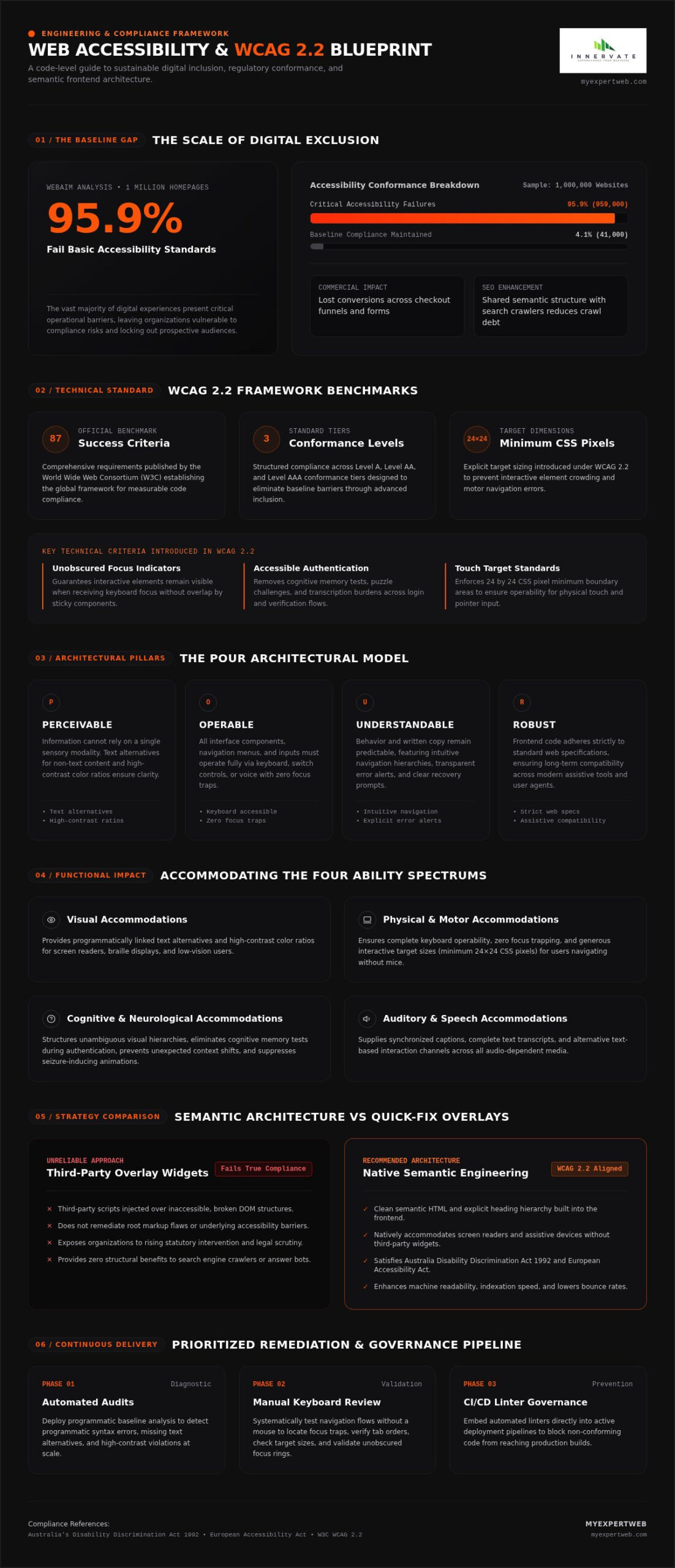
According to WebAIM’s 2026 analysis of one million homepages, 95.9% of websites still fail basic accessibility standards. If you are trying to solve how to make a website accessible for people with disabilities, you aren’t alone; many development teams feel overwhelmed by dense technical criteria and rising legal scrutiny. Automated overlay widgets often promise an effortless shortcut, but lasting digital inclusion cannot simply be injected with a third-party script.
It’s completely understandable to worry that strict standards might restrict creative visual design, slow down release cycles, or hinder conversion rates. However, you don’t have to compromise user engagement to build an inclusive digital platform. In this guide, you’ll discover a practical, code-level roadmap to achieve WCAG 2.2 conformance, eliminate critical usability barriers, and protect your organisation against regulatory risk.
Ahead, we break down foundational frontend engineering techniques, core compliance benchmarks, and a prioritised remediation workflow that turns accessibility into a repeatable technical advantage.
Key Takeaways
- Explore why digital accessibility represents foundational engineering rather than cosmetic adjustments, directly benefiting users across auditory, physical, cognitive, and visual spectrums.
- Understand the international compliance benchmark set by WCAG 2.2 and how meeting these criteria protects your organisation from rising regulatory scrutiny.
- Learn why automated overlay widgets fail to deliver true compliance and why semantic frontend architecture remains the only sustainable path forward.
- Follow an actionable, code-level guide on how to make a website accessible for people with disabilities using automated audits and systematic manual keyboard reviews.
- Establish continuous accessibility governance across your development workflow by embedding automated linters directly into active deployment pipelines.
What Is Web Accessibility and Why Is It Essential?
Web accessibility is the deliberate practice of digital engineering that removes operational barriers, allowing people of all abilities to interact with software, content, and online tools independently. Rather than treating inclusion as a visual after-thought, it builds user interfaces that adapt gracefully to individual needs. Understanding the foundational principles of web accessibility ensures your digital products serve users across auditory, cognitive, physical, speech, and visual spectrums without friction.
At a functional level, accessible development directly accommodates diverse requirements:
- Visual: Providing programmatically linked text alternatives and high-contrast color ratios for screen readers and low-vision users.
- Physical and motor: Ensuring complete keyboard operability and generous touch target sizes for users who navigate without a mouse.
- Cognitive and neurological: Structuring clear visual hierarchies, avoiding unexpected context shifts, and eliminating seizure-inducing animations.
- Auditory and speech: Supplying synchronized captions, transcripts, and alternative text-based interaction channels.
Clean markup directly elevates your search engine visibility. Search engine crawlers navigate digital pages using essentially the same structural logic as screen readers. When you master how to make a website accessible for people with disabilities, you naturally produce clean semantic HTML, explicit heading structures, and machine-readable data. This technical foundation enhances indexation and reduces overall crawl debt across search platforms.
Exclusion carries a quantifiable commercial cost. When checkout funnels or forms fail assistive technology, businesses lose valuable conversions. Designing for universal access widens your serviceable market, reinforces brand credibility, and creates frictionless interactions that retain customers across every demographic.
The Core Principles of Accessible Architecture: Understanding POUR
Modern accessibility centres on four engineering pillars established by international standards:
- Perceivable: Information cannot depend on a single sensory modality. Text alternatives for non-text content and sufficient contrast ensure information reaches every user clearly.
- Operable: All interface components, menus, and forms must function entirely via keyboard, switch controls, or voice commands without creating focus traps.
- Understandable: Interface behavior and written content must remain predictable, featuring intuitive navigation patterns, transparent error identification, and clear recovery prompts.
- Robust: Frontend code must adhere strictly to established web specifications, ensuring long-term compatibility across modern browsers, assistive devices, and emerging user agents.
Beyond Compliance: The Legal, Commercial, and Brand Case
Organisations face rising scrutiny under statutory frameworks, including Australia’s Disability Discrimination Act 1992 and international benchmarks like the European Accessibility Act. Learning how to make a website accessible for people with disabilities provides essential legal protection against regulatory intervention and civil disputes.
Beyond risk mitigation, accessible platforms lower bounce rates by delivering intuitive interactions. Semantic code structures also streamline machine readability, enabling AI search engines and answer bots to interpret your content accurately, giving your business an edge across every modern discovery channel.
Core Standards and Guidelines: Navigating WCAG 2.2 Requirements
The global benchmark for digital accessibility is established by the World Wide Web Consortium through its published standards. The official recommendation, WCAG 2.2, features 87 Success Criteria across three distinct conformance tiers. It expands on previous releases by introducing strict rules regarding obscured focus indicators, minimum interactive target sizing of 24 by 24 CSS pixels, and accessible authentication mechanisms that remove cognitive memory tests. For engineering teams evaluating how to make a website accessible for people with disabilities, WCAG 2.2 provides the definitive, measurable framework for code compliance.
Modern software architecture must natively accommodate a diverse ecosystem of assistive tools. Screen readers, refreshable braille displays, switch hardware, voice recognition systems, and screen magnification software depend entirely on programmatic transparency. In complex web applications and single-page frameworks, your custom components, dynamic modals, and route changes must communicate their states reliably through native browser APIs.
Decoding WCAG Conformance Levels: A, AA, and AAA
The guidelines structure criteria into three progressive tiers:
- Level A: The minimum technical threshold. Meeting Level A eliminates catastrophic barriers, such as unlabelled form fields or unnavigable keyboard blocks, but leaves significant usability friction intact.
- Level AA: The globally recognized commercial and legal benchmark. Meeting Level AA ensures comprehensive operability for everyday digital interactions, balancing stringent usability with practical engineering feasibility.
- Level AAA: The most specialized tier. While beneficial for dedicated public resources or specialized audiences, applying Level AAA universally across dynamic commercial applications is often technically impractical due to design constraints.
How Assistive Technologies Interact with Web Codebases
Assistive devices rarely parse raw visual rendering. Instead, user agents translate your semantic Document Object Model into an internal accessibility tree. Screen readers like NVDA or VoiceOver read computed names, roles, and states directly from this tree, while speech navigation software relies on these programmatic labels to trigger interface clicks.
Interactive single-page applications often break this communication pipeline through preventable structural flaws:
- Using generic
<div>tags for interactive triggers instead of semantic<button>elements, leaving screen readers unaware that an item is clickable. - Failing to manage programmatic keyboard focus during asynchronous modal transitions or slide-out carts.
- Over-applying redundant ARIA attributes that conflict with native browser accessibility states.
Refactoring these dynamic application workflows requires deep engineering precision. If your team needs experienced support auditing complex software architectures, partnering with a technical team at MyExpertWeb can help you integrate clean semantic patterns directly into your codebase, ensuring you master how to make a website accessible for people with disabilities across every screen.
Semantic Architecture vs Quick-Fix Overlays: Choosing the Right Technical Path
Organisations looking into how to make a website accessible for people with disabilities often face two diverging strategies: refactoring the underlying codebase or dropping in an automated overlay plugin. While third-party JavaScript widgets promise instant compliance with minimal developer overhead, they cannot fundamentally fix broken source code. Over 600 accessibility professionals confirmed this reality in the public Overlay Fact Sheet, clarifying that superficial script layers cannot remediate underlying architectural barriers.
The gap between genuine code refactoring and automated widgets becomes stark when comparing operational impacts:
| Evaluation Metric | Native Semantic Refactoring | Automated Accessibility Plugins |
|---|---|---|
| Legal Protection | Substantive remediation aligning with the Department of Justice ADA web accessibility guidance. | Zero statutory protection; over 1,400 widget-equipped websites faced federal lawsuits in 2025. |
| Screen Reader Usability | Integrates cleanly with personal user configurations. | Frequently hijacks custom keybindings and causes redundant speech loops. |
| Performance Overhead | Zero bloat; removes redundant scripts and clarifies the DOM. | Injects heavy client-side JavaScript, degrading Core Web Vitals and mobile responsiveness. |
| Long-Term Cost | Permanent technical asset built into modern design systems. | Recurring subscription fees that leave the underlying software broken when cancelled. |
The Power of Semantic HTML5 and Thoughtful ARIA Roles
Native HTML5 elements carry built-in browser behavior, full keyboard support, and established accessibility names. Replacing non-semantic <div> elements with structural tags like <main>, <nav>, and <button> instantly supplies assistive tech with operational context. The primary rule of ARIA is straightforward: don’t use custom ARIA markup if an equivalent native HTML element already exists. Establishing a logical heading structure from H1 through H4 provides screen reader users with an accurate outline of your page layout.
The Inherent Risks and Limitations of Accessibility Plugins
Automated overlays attempt to manipulate client-side DOM elements on the fly, but assistive tech users often find their pre-set browser defaults completely overridden. Regulators have responded firmly to misleading claims. In April 2025, the U.S. Federal Trade Commission fined major vendor accessiBe $1 million for deceptive advertising regarding automated compliance capabilities. Widgets also serve as visible beacons for plaintiffs’ attorneys, drawing legal scrutiny rather than deterring it.
Visual Hierarchy, Typography, and Contrast Standards
Sustainable visual design relies on rigorous contrast and scalable layouts. Standard body text requires a minimum contrast ratio of 4.5:1 against its background, while large text (18pt or 14pt bold) demands at least 3:1. When planning how to make a website accessible for people with disabilities, set font sizes using relative units such as rem or em rather than fixed pixels. This ensures layouts flex predictably when users increase default browser zoom levels, preserving readability without breaking layout containers.
Step-by-Step Implementation: How to Make a Website Accessible
Executing digital accessibility requires a disciplined engineering sequence. Rather than attempting to patch issues haphazardly, technical teams need a structured remediation pipeline that isolates syntax bugs, validates interactive components, and resolves dynamic content friction. Understanding how to make a website accessible for people with disabilities comes down to executing five sequential stages:
- Run automated baseline audits: Scan your templates with open-source tools like Axe-core or Lighthouse to flag low-hanging structural failures instantly.
- Conduct manual keyboard walkthroughs: Unplug the mouse to trace focus indicators, check tab sequencing, and confirm zero keyboard traps exist across all flows.
- Refactor semantic architecture: Convert generic containers into native HTML controls, bind explicit programmatic labels, and build consistent heading hierarchies.
- Remediate dynamic media: Add contextual text descriptions for informational imagery and provide synchronized captions and downloadable transcripts for multimedia.
- Validate against assistive tooling: Test critical user journeys using actual screen readers like NVDA or VoiceOver to verify computed names and state changes.
Conducting Rigorous Automated and Manual Technical Audits
Automated scanning engines catch roughly 30% to 40% of WCAG infractions, including color contrast discrepancies and unassigned image tags. The remaining majority requires hands-on human evaluation. Navigate your site using only the Tab, Shift+Tab, Enter, and arrow keys. Check that interactive modals trap focus internally while open, release focus back to the triggering element upon closing, and display a prominent visual focus outline at every stop.
Remediating Forms, Dynamic Controls, and Error Handling
Forms represent the highest-friction zone for users relying on assistive hardware. Every form input requires an explicit, permanent label bound via matching <label for="id"> and <input id="id"> attributes. Avoid relying on placeholder text, which vanishes upon input and fails contrast minimums. Dynamic field validation must announce errors via aria-live="polite" regions so non-sighted visitors receive immediate corrective feedback without disorienting context shifts. Under updated standards, verify touch targets measure at least 24 by 24 CSS pixels with adequate clearance.
Accessible Media: Descriptive Alt Text, Captions, and Transcripts
Alt text should explain the communicative intent of an image rather than just its literal appearance. Decorative assets should carry an empty alt="" attribute to allow screen readers to skip them entirely. For audio and video content, furnish accurate synchronized closed captions along with a full text transcript. Avoid autoplaying audio or looping canvas animations without user-initiated pause controls.
Remediating enterprise platforms requires methodical code-level refactoring. You can streamline your compliance journey by hiring an experienced web development team to audit and refactor your digital assets today.
Long-Term Accessibility Governance and Building Custom Accessible Platforms
Remediating accessibility defects is only half the battle; maintaining compliance as platforms evolve requires ongoing operational governance. A single redesign, unvetted plugin, or routine marketing campaign can easily reintroduce critical usability barriers. Achieving long-term success with how to make a website accessible for people with disabilities means treating digital inclusion as a core engineering discipline embedded into your continuous integration pipelines, content workflows, and software lifecycle.
Automated checks in your deployment pipelines provide an essential first line of defense. Integrating tools such as axe-core linters into Git pre-commit hooks flags non-semantic elements or missing aria attributes before pull requests reach production. Content management systems should also enforce mandatory alt text fields and heading hierarchy validations, ensuring non-technical editorial teams don’t inadvertently create accessibility bottlenecks.
Integrating Accessibility into Design Systems and Agile Sprints
Modern product teams maintain compliance by baking accessibility straight into their shared UI component libraries. Centralising accessible components offers significant development advantages:
- Pre-validated components: Buttons, interactive tabs, form controls, and dialog modals are audited once for keyboard handling and screen reader support, then reused across entire applications.
- Agile acceptance criteria: Sprint user stories explicitly include WCAG 2.2 requirements, ensuring accessibility testing is completed before a feature is marked done.
- Automated regression testing: End-to-end test suites run accessibility checks during every staging build, preventing regressions as new functional features merge.
Partnering with Experienced Engineering Teams for Scale and Compliance
Complex digital architectures often carry years of legacy technical debt. Retrofitting single-page frameworks, custom web applications, or proprietary enterprise portals demands deep engineering expertise. For many growing organisations, building an in-house accessibility task force is simply cost-prohibitive or operationally challenging.
Engaging a seasoned engineering partner can bridge this technical gap efficiently. Dedicated offshore developer staffing allows your business to rapidly scale remediation capacity, refactor messy frontend codebases, and maintain compliance standards alongside daily feature development. By aligning your long-term roadmap with practical technical specialists at MyExpertWeb, you ensure your platforms stay resilient, fully usable, and legally protected as standards continue to evolve. Ultimately, mastering how to make a website accessible for people with disabilities turns compliance into an enduring competitive advantage.
Future-Proof Your Platform Through Resilient Engineering
Building an inclusive digital environment is a strategic technical choice rather than an administrative hurdle. When evaluating how to make a website accessible for people with disabilities, remember that true compliance begins in your source code. Replacing superficial plugin overlays with native semantic HTML, strict keyboard navigation paths, and robust design tokens protects your organisation against legal risk while expanding access for every user.
Sustainable accessibility thrives on continuous development governance. By integrating automated linting into deployment pipelines and enforcing clear acceptance criteria in your sprints, your platform maintains peak usability as your feature sets grow.
With more than 12 years of proven engineering experience delivering robust, accessible custom web solutions, our full-stack team is ready to help you audit, refactor, and scale your digital architecture. Whether you need an in-depth codebase audit or dedicated developers to support your roadmap, partner with MyExpertWeb for expert custom web development and accessibility audits. Taking proactive ownership of your codebase today ensures an empowering, frictionless digital journey for every visitor tomorrow.
Frequently Asked Questions
What is the difference between WCAG 2.1 and WCAG 2.2?
WCAG 2.2 builds directly on the 2.1 foundation by introducing nine new success criteria while officially deprecating 4.1.1 Parsing. Key additions focus on cognitive accessibility and modern mobile interactions. These include accessible authentication without cognitive tests, minimum interactive touch target sizes of 24 by 24 pixels, dragging alternatives, and requirements preventing interactive focus indicators from being hidden behind sticky footers or banners.
Can automated tools and plugins make a website 100% accessible?
No automated software or overlay plugin can achieve complete accessibility. Automated testing engines typically detect only 30% to 40% of WCAG conformance errors, such as basic contrast issues or missing image tags. Subjective and behavioral criteria, such as logical keyboard tab orders, context-sensitive error descriptions, and dynamic screen reader announcements, require manual code-level engineering and hands-on human evaluation.
What are the most common accessibility issues found on modern websites?
The WebAIM Million analysis shows that six recurrent errors account for 96% of detected accessibility failures. These include low-contrast body text, missing image alt attributes, unlabelled form inputs, empty hyperlinks, unlabelled buttons, and absent document language tags. Fixing these recurring frontend oversights forms the initial baseline when learning how to make a website accessible for people with disabilities.
How does website accessibility improve search engine optimization (SEO)?
Search engine web crawlers interact with web pages similarly to screen readers, interpreting programmatic document hierarchy rather than visual design. Structuring clean semantic HTML, implementing hierarchical heading tags, adding descriptive image alt text, and eliminating dead interactive links directly assist search bots in indexing your content efficiently. This clean architecture reduces crawl overhead and bolsters organic visibility across modern discovery platforms.
Do accessibility standards apply to mobile applications and responsive mobile sites?
Yes, WCAG standards apply equally across responsive mobile websites and native smartphone applications. Criteria in WCAG 2.2 specifically emphasize mobile ergonomics, mandating minimum 24 by 24 CSS pixel touch targets and single-pointer alternatives for complex gestures like swiping or dragging. Ensuring mobile viewports accommodate up to 400% text zoom without breaking horizontal layouts is also essential for full mobile conformance.
How much time does it take to remediate an inaccessible website?
Remediation timelines vary significantly based on platform scale, architectural complexity, and legacy technical debt. Simple brochure websites often take two to four weeks to audit and refactor. In contrast, enterprise platforms or custom web applications featuring complex dynamic checkouts and authenticated user dashboards can take several months. A phased workflow prioritising high-traffic user journeys delivers the quickest compliance relief.
What is the first step a business should take when beginning an accessibility audit?
The initial step is establishing an honest technical baseline across your primary digital journeys. Begin by running an open-source automated scanner like Axe-core on core page templates to catalog immediate syntax failures. Pair this scan with a simple keyboard-only navigation test through your main conversion funnel. This highlights where your team must focus when determining how to make a website accessible for people with disabilities.