


MyExpertWeb Team
September 21, 2026
Why Is My Business Website So Slow? A 2026 Guide to Performance Optimization
Did you know that a mere 100-millisecond delay in your page load time could be slicing your conversion rates by a full percentage point? It’s a sobering reality for many companies, especially when research shows that over 53% of mobile users will abandon a site if it takes longer than three seconds to load. You’ve likely spent hours wondering why is my business website so slow while watching potential leads slip away to faster competitors. It’s frustrating to deal with inconsistent performance across devices or feel lost in a sea of technical jargon that doesn’t seem to solve the core problem.
We understand that a website is more than just code; it’s the digital storefront where your brand builds trust. This guide provides the technical and strategic clarity you need to reclaim your search rankings and improve user experience. We’ll examine the specific bottlenecks currently hurting your bottom line, such as JavaScript bloat and the shift toward Interaction to Next Paint (INP) benchmarks. By the end of this article, you’ll have an actionable roadmap to optimize your site for 2026 standards, ensuring your digital presence is as fast, reliable, and professional as the services you provide.
Key Takeaways
- Understand how performance acts as a foundational pillar for modern SEO and local search visibility.
- Identify the core technical reasons why is my business website so slow, ranging from server-side limitations to unoptimized high-resolution media.
- Learn to differentiate between lab data and real-world metrics like Interaction to Next Paint (INP) to measure actual user responsiveness.
- Discover how custom software development avoids the performance-draining bloat often found in generic website templates.
- Evaluate when to utilize simple optimization plugins and when a professional technical audit is required to protect your site’s functionality.
The Business Impact of Slow Website Performance in 2026
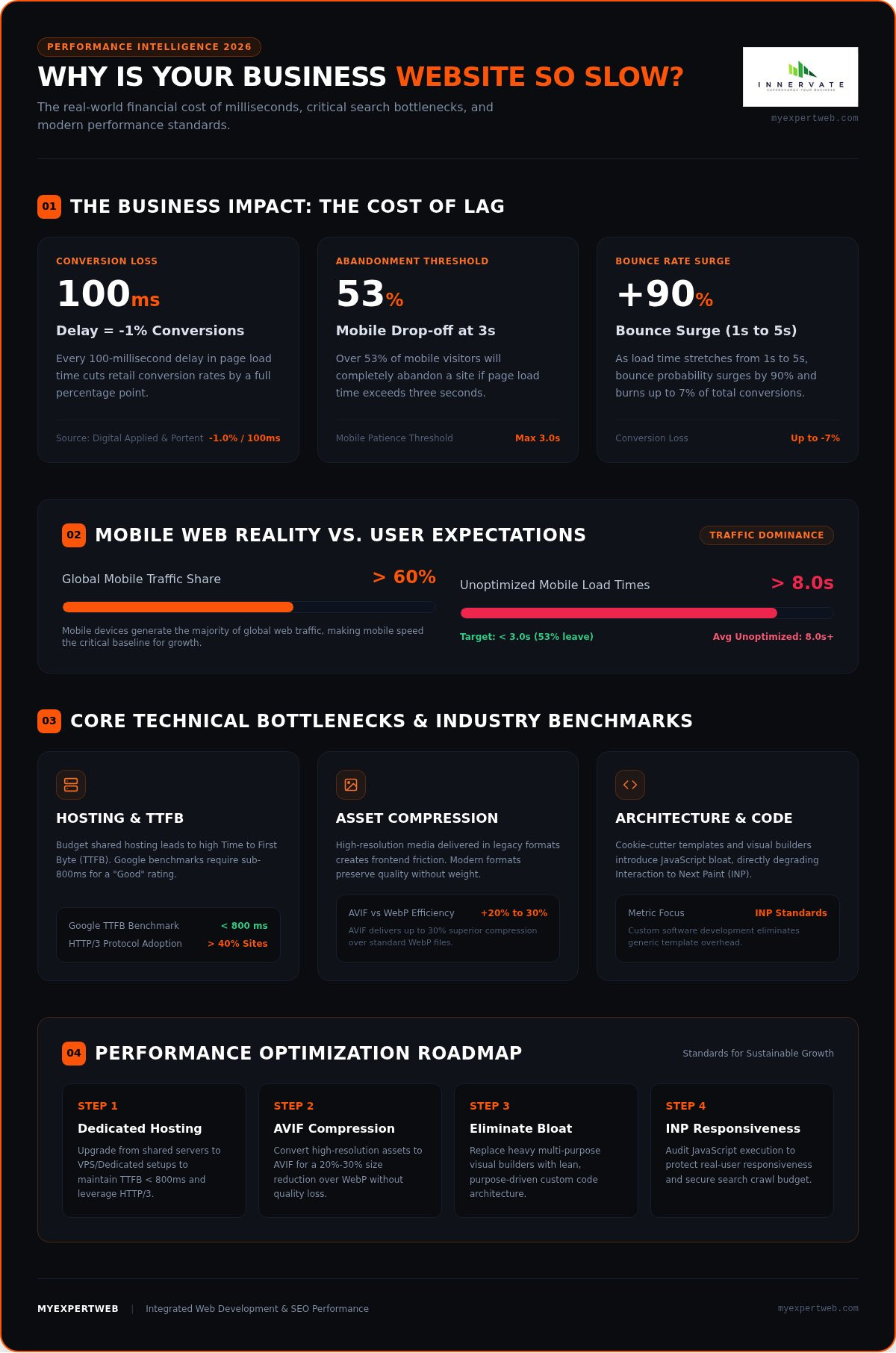
In 2026, website speed is the invisible handshake that introduces your business to a potential client. When you ask, “why is my business website so slow,” you aren’t just identifying a technical glitch; you’re identifying a leak in your revenue stream. Modern users have zero tolerance for lag. Data from Digital Applied and Portent indicates that every 100ms delay in page load cuts retail conversion rates by approximately 1%. If your site takes five seconds to load instead of one, you could be losing up to 7% of your total conversions. This isn’t just about impatience. It’s about professional credibility. A sluggish site creates psychological friction, making users question your brand’s reliability before they even see your offer.
Speed is no longer a luxury. It’s a foundational requirement. We view performance as a critical pillar of integrated web development and SEO services because it dictates whether your marketing efforts actually result in growth. A fast site builds trust instantly. It tells the visitor that your business is efficient, modern, and attentive to their needs. When a page loads instantly, the barrier between the user’s intent and your solution disappears.
Search Engine Visibility and the Speed Factor
Google’s 2026 ranking algorithms treat performance as a non-negotiable metric. High-speed sites are prioritized because they provide a better experience for searchers. Beyond direct rankings, speed impacts your crawl budget. If your server is slow, search bots spend more time waiting for pages to load and less time indexing your new content. This delay keeps your latest updates out of the zero-click search landscape, where Google features snippets and direct answers. Effective web performance optimization ensures your site remains visible and accessible to both bots and humans. If your site lags, you’re essentially handing your search real estate to faster competitors.
User Experience and Conversion Retention
Mobile devices now account for over 60% of global web traffic, yet mobile page load times often exceed eight seconds on unoptimized sites. Your desktop speed is no longer the primary benchmark for success. Performance directly affects customer lifetime value. A fast, frictionless journey from your landing page to the checkout creates a positive first impression that encourages repeat business. Conversely, a high bounce rate ensures that your marketing spend on lead generation is largely wasted. As load time stretches from one to five seconds, the probability of a bounce surges by 90%. Consistent speed across all devices is the only way to retain the leads you work so hard to attract.
Identifying the Technical Bottlenecks Behind a Slow Site
When you find yourself asking why is my business website so slow, the problem usually stems from a combination of infrastructure and asset delivery. Technical bottlenecks aren’t always visible to the naked eye, but they manifest as delays that frustrate users and trigger search engine penalties. Identifying these issues is the first step toward a more reliable digital presence. It’s often the case that multiple minor inefficiencies aggregate into a major performance hurdle.
The Pitfalls of Unmanaged Hosting Environments
Your server is the engine of your website. Budget shared hosting often forces your site to compete for resources with thousands of others, leading to a high Time to First Byte (TTFB). For a “Good” rating, Google recommends a TTFB under 800 milliseconds. If your server is physically far from your audience or lacks modern protocols like HTTP/3, which is now used by over 40% of websites, your performance will suffer regardless of how well your code is written. Moving to a VPS or dedicated environment provides the stability needed for consistent growth.
Code bloat is another silent killer. If you are still investigating why is my business website so slow, consider the impact of “cookie-cutter” WordPress themes or visual builders. These tools prioritize ease of use over efficiency, creating a heavy footprint that slows down every interaction. Our custom software development approach addresses this by building lean, purpose-driven applications that avoid the overhead of generic templates.
Frontend Friction: Images, Scripts, and Stylesheets
Large, unoptimized images are frequently the primary cause of slow load times. While high-resolution visuals are important for brand aesthetics, they must be delivered in modern formats like AVIF or WebP. AVIF offers 20% to 30% better compression than WebP, allowing you to maintain quality without the weight. Beyond images, your site may struggle with “render-blocking” resources. These are files that prevent the browser from displaying the page until they are fully downloaded and processed. Understanding browser rendering and performance metrics is essential for diagnosing which scripts are stalling your site.
Third-party scripts, such as tracking pixels, chat widgets, and social media feeds, represent a significant drag on performance in 2026. Each one adds an external request that your site doesn’t control. While these tools provide data, their cumulative impact often outweighs their utility. We recommend a “less is more” approach to plugins; if a feature doesn’t directly contribute to your business goals, it’s likely just adding unnecessary friction to the customer journey.
Diagnostic Tools: Lab Data vs. Real User Monitoring
Diagnosing performance issues requires a balance between synthetic testing and real-world observation. You might look at a high score in a lab test and still wonder why is my business website so slow when real customers complain about lag. Lab data is collected in a controlled environment, which is excellent for debugging specific code changes. However, Google’s actual ranking signals rely on field data, known as the Chrome User Experience Report (CrUX). This data reflects the experiences of real users over a rolling 28-day window, measured at the 75th percentile (P75). To truly understand your site’s health, you must look beyond the simplified lighthouse score and analyze how your infrastructure handles diverse network conditions.
Understanding Core Web Vitals for Non-Techies
Google uses three primary metrics to define a “good” user experience. Largest Contentful Paint (LCP) measures how quickly the main content of your page becomes visible; a score of 2.5 seconds or less is the target. Cumulative Layout Shift (CLS) tracks visual stability, ensuring your buttons or text don’t jump around as the page loads. The most critical update in recent years is Interaction to Next Paint (INP), which replaced First Input Delay in March 2024. INP measures the responsiveness of every click, tap, or keypress. If your INP is higher than 200 milliseconds, users will perceive your site as unresponsive, even if the initial load was fast.
Free Tools for an Instant Speed Audit
Start your audit with Google PageSpeed Insights to see both your lab and field data in one place. For a deeper dive, WebPageTest and GTmetrix provide waterfall analysis, showing you exactly which file or third-party script is stalling your progress. You can also use Chrome DevTools directly in your browser to run local performance checks. These benchmarks are supported by the W3C Web Performance Working Group standards, which ensure that browser manufacturers and developers have a unified way to measure latency and interactivity.
Identifying the “low-hanging fruit” is your first priority. Audit reports often highlight oversized images or unused JavaScript that can be addressed quickly. However, catching regressions requires a continuous monitoring rhythm. Performance isn’t a one-time project; it’s a vital sign that needs regular check-ups. By setting up automated alerts, you ensure that a new plugin or a heavy marketing asset doesn’t quietly tank your rankings. If you’ve addressed the basics and still find yourself asking why is my business website so slow, it’s time to look at server-side optimizations or database indexing.
Strategic Fixes to Restore Your Website’s Speed
Resolving performance issues requires a methodical approach that balances technical effort with business impact. Instead of chasing every minor suggestion in an audit report, you should focus on high-impact changes that directly improve your Core Web Vitals. Implementing a Content Delivery Network (CDN) is often the most effective step for global businesses. A CDN places your content physically closer to the user and leverages modern protocols to reduce packet loss. If you still find yourself asking why is my business website so slow, the answer often lies in how you manage your assets and server resources.
Media and Asset Optimization
Images and videos are typically the heaviest elements on any page. Automating image compression and implementing lazy loading ensures that browsers only download assets as they are needed. While high-resolution video is engaging, self-hosting these files is a common mistake that drains server bandwidth. Using specialized third-party hosting providers allows you to embed content without sacrificing speed. Additionally, minifying your CSS and JavaScript files removes unnecessary characters and whitespace, reducing the total amount of data transferred during each visit. These small efficiency gains accumulate to significantly lower your Largest Contentful Paint (LCP) scores.
Advanced Caching and Server-Side Improvements
Caching is your most powerful tool for reducing server load. Page caching stores a static version of your site to serve to visitors, while object caching, using tools like Redis, stores database query results to speed up dynamic interactions. For high-traffic business sites, regular database maintenance is essential. Cleaning up post revisions, expired transients, and overhead keeps your database lean and responsive. If your current setup feels restrictive, moving to a headless CMS architecture can decouple your frontend from the backend, allowing for near-instant load times that traditional monolithic platforms struggle to match.
Eliminating legacy bloat is often the only way to achieve long-term stability. Transitioning to secure web application development allows you to build a foundation that is fast by design rather than trying to fix a broken template. By prioritizing clean code and modern infrastructure, you protect your search rankings and provide a better experience for your leads. If you are ready to identify the specific bottlenecks holding your growth back, contact our team for a professional performance audit to start your optimization journey.
When to DIY vs. Hiring a Professional Optimization Team
Deciding whether to handle optimization in-house or outsource it is a common dilemma for growing businesses. While “Quick Fix” plugins offer an attractive entry point, they often act as a band-aid rather than a cure. If you’re still asking why is my business website so slow after installing multiple caching tools, it’s likely because these plugins are adding their own layer of script bloat. DIY code changes also carry the significant risk of breaking site functionality or compromising security while you’re chasing a higher Lighthouse score. A professional approach ensures that your site’s core architecture is sound, preventing the need for constant, reactive troubleshooting.
For SMEs looking to scale, the ROI of professional optimization becomes clear when you consider the high cost of lost leads. Investing in custom business application development inherently solves many performance issues by replacing generic, heavy frameworks with lean, purpose-built code. This transition moves your digital presence from a state of constant repair to a foundation of reliable, high-speed performance that supports your long-term business goals. It’s about building a stable asset rather than managing a series of technical compromises.
The Value of a Dedicated Development Partner
A methodical guide doesn’t just look at load times; they look at how performance integrates with your overall digital strategy. At MyExpertWeb, we leverage our 12 years of experience and dedicated development teams to perform deep-level audits that uncover server-side bottlenecks and database inefficiencies. We don’t believe in one-time fixes that fail after the next software update. Instead, we focus on a collaborative approach that integrates security and user experience into the optimization process. This ensures your site remains fast and functional as your traffic grows, providing a consistent experience for every visitor.
Your Next Steps for a Faster Website
You can begin assessing your site’s health today with a simple 10-minute checklist. Start by running a report on Google PageSpeed Insights to identify your current Core Web Vital scores. Check for oversized hero images that lack modern compression and review your plugin list for any tools you haven’t used in the last three months. Finally, verify that your hosting provider supports HTTP/3 and modern server-side caching. These initial steps will give you a clearer picture of the specific hurdles your site faces.
While these steps provide a starting point, a custom performance roadmap is essential for complex business environments. Consulting with experts allows you to prioritize fixes based on their potential impact on your conversion rates and search rankings. If you’re ready to stop wondering why is my business website so slow and start seeing real results, contact MyExpertWeb for a free consultation on your site’s performance. We’ll help you build a stable, results-focused digital presence that positions your brand as a leader in your industry.
Building a High-Performance Digital Future
In 2026, performance is the foundation of your digital credibility. We’ve explored how technical bottlenecks like server latency and third-party script bloat contribute to the question of why is my business website so slow. By shifting your focus from synthetic lab scores to real user monitoring and Interaction to Next Paint (INP) metrics, you can make strategic improvements that directly impact your bottom line. Speed is no longer just a technical checkbox; it’s a primary conversion engine.
At MyExpertWeb, we bring 12+ years of digital agency experience to every partnership. As specialists in high-performance custom software, we understand how to eliminate the legacy bloat that generic templates often impose on your business. Our proven track record in national SEO growth demonstrates that speed is a primary driver of visibility and trust. Whether you’re refining your current site or building a custom application from the ground up, we’re here to guide you through the process with pragmatic, results-focused solutions.
Ready to fix your slow website? Book a free consultation with MyExpertWeb today.
Taking the first step toward optimization is an investment in your brand’s long-term viability. We look forward to helping you reclaim your rankings and provide the seamless experience your customers expect.
Frequently Asked Questions
How fast should my business website load in 2026?
Your website should ideally load in under one second to maximize conversion rates. In 2026, the benchmark for a “Good” Largest Contentful Paint (LCP) is 2.5 seconds or less. Research shows that sites loading in one second achieve up to 3x higher conversion rates than those taking five seconds. Aiming for these thresholds ensures you don’t lose potential leads to faster competitors who prioritize a frictionless user experience.
Can my choice of website theme really make my site slow?
Yes, generic themes often include excessive code and features you’ll never use. This “code bloat” forces browsers to download and process unnecessary scripts, which is a common reason why is my business website so slow. While “all-in-one” builders are convenient for setup, they rarely prioritize the lean architecture required for high-speed performance. Transitioning to custom software development allows you to build a site that’s fast by design rather than trying to fix a heavy template.
Will adding more plugins to fix speed actually work?
Adding more plugins is rarely the solution and often worsens the problem. While a single, well-configured caching plugin can help, every additional tool adds its own set of scripts and database queries. This cumulative load can stall your server response times and create conflicts that break site functionality. Instead of relying on “band-aid” plugins, focus on structural improvements like image optimization and server-side caching to achieve sustainable, long-term performance gains.
What is the difference between mobile speed and desktop speed?
Mobile speed is measured on slower processors and variable network conditions, such as 4G or 5G, whereas desktop speed assumes stable high-speed connections. Because Google uses mobile-first indexing, your mobile performance is the primary factor for your search rankings. Currently, only about 42% to 48% of mobile sites pass all Core Web Vitals thresholds. Optimizing for mobile requires a focus on reducing JavaScript execution time and ensuring visual stability across smaller screens.
Does website speed affect my Google Ads (PPC) performance?
Website speed significantly impacts your Quality Score and your cost-per-click (CPC) in Google Ads. A slow landing page provides a poor user experience, which leads Google to penalize your ads with lower rankings or higher costs. If your page takes longer than three seconds to load, over 53% of mobile users may abandon the site before your offer even appears. Improving speed ensures you get the full value from your PPC management budget.
How often should I audit my website’s speed?
You should perform a comprehensive speed audit at least once every quarter or whenever you implement significant updates. Performance isn’t a one-time project; it’s a vital sign that can fluctuate as you add new content, plugins, or marketing trackers. Regular audits help you catch regressions early and ensure your site remains compliant with the latest 2026 search algorithm updates. Constant monitoring allows you to maintain the competitive edge you’ve built through optimization.
What are Core Web Vitals and why should I care?
Core Web Vitals are three specific metrics Google uses to measure user experience: Largest Contentful Paint (loading), Cumulative Layout Shift (visual stability), and Interaction to Next Paint (responsiveness). You should care because these metrics are direct ranking signals in Google’s search algorithm. If your site fails these thresholds, your visibility in search results will likely decrease. Understanding these vitals helps you identify exactly why is my business website so slow and provides a clear roadmap for technical fixes.
Is it worth upgrading my hosting just for speed?
Upgrading your hosting is often the most impactful way to reduce your Time to First Byte (TTFB). Budget shared hosting forces your site to share resources with thousands of others, leading to inconsistent performance and high latency. Moving to a VPS or dedicated environment provides the dedicated resources needed to handle traffic spikes and process complex database queries quickly. For a professional business site, stable and fast hosting is a foundational investment in your digital growth.